+HOTEL OPERATIONS SUPPORT
A team that comes
with the platform.
Innwaya comes with a team that can help you operate your hotel. We work alongside your people, using the portal to keep responsibilities, coordination and follow-through connected.
Tell us where your property needs help, and we’ll discuss the support that fits your day-to-day operations.
Discuss support for your hotel ↗SALES & FOLLOW-UP
Keep the next opportunity moving.
Work sales inquiries in Workspace, with an owner, follow-up date and a next step for each conversation.
The Group Leads pipeline sits above the Sales inquiry list, showing opportunity value and booking probability. Open the full lead to keep proposal details, files and follow-up together.
- Sales inquiries
- Group Leads pipeline
- Owners & follow-up
See Workspace ↗
REVENUE PLANNING
Put the bigger picture in view.
Bring Rate Shopping, STR / STAR reports and the Compression Calendar into a shared revenue workspace. Keep market information and planning close to your hotel’s daily results.
Review competitive rates and local demand events for rate discussions, then follow group opportunities through Sales inquiry in Workspace.
- Rate shopping
- STR / STAR reports
- Compression Calendar
See revenue and occupancy ↗
WORKFORCE MANAGEMENT
Keep the people side organized.
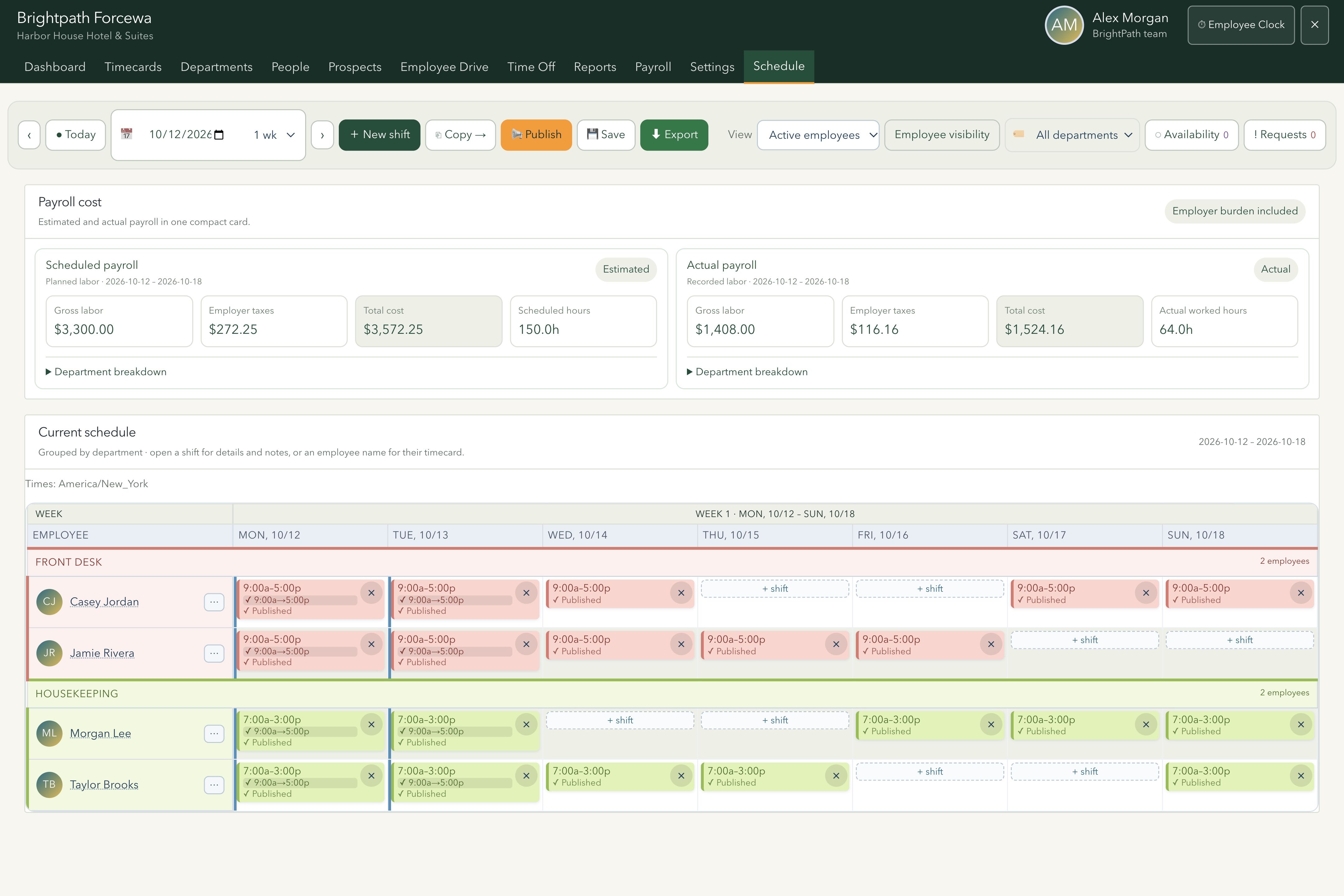
Connect employee records, onboarding, schedules, timecards and time-off requests. Plan coverage in a compact department schedule and open a shift or employee’s timecard for the details.
Compare planned shifts with recorded attendance. Authorized managers can review scheduled and actual payroll estimates, including the configured employer tax burden.
- Scheduling & timecards
- Employee onboarding
- Labor visibility
See the schedule ↗
FACIAL-RECOGNITION TIME CLOCK
A verified punch.
A connected timecard.
Employees use their PIN and, where enabled, camera-based facial verification to record a punch. Clock-ins, clock-outs and enabled break punches connect directly to their timecards.
Where geofencing is configured, location checks verify each punch against the hotel’s worksite boundary. Managers can see who is clocked in now and review attendance alongside schedules and timecards.
- Facial verification
- Geofenced punches
- Clock-in & clock-out
- Connected timecards
See the employee clock ↗
TASKS & COLLABORATION
Know who owns the next step.
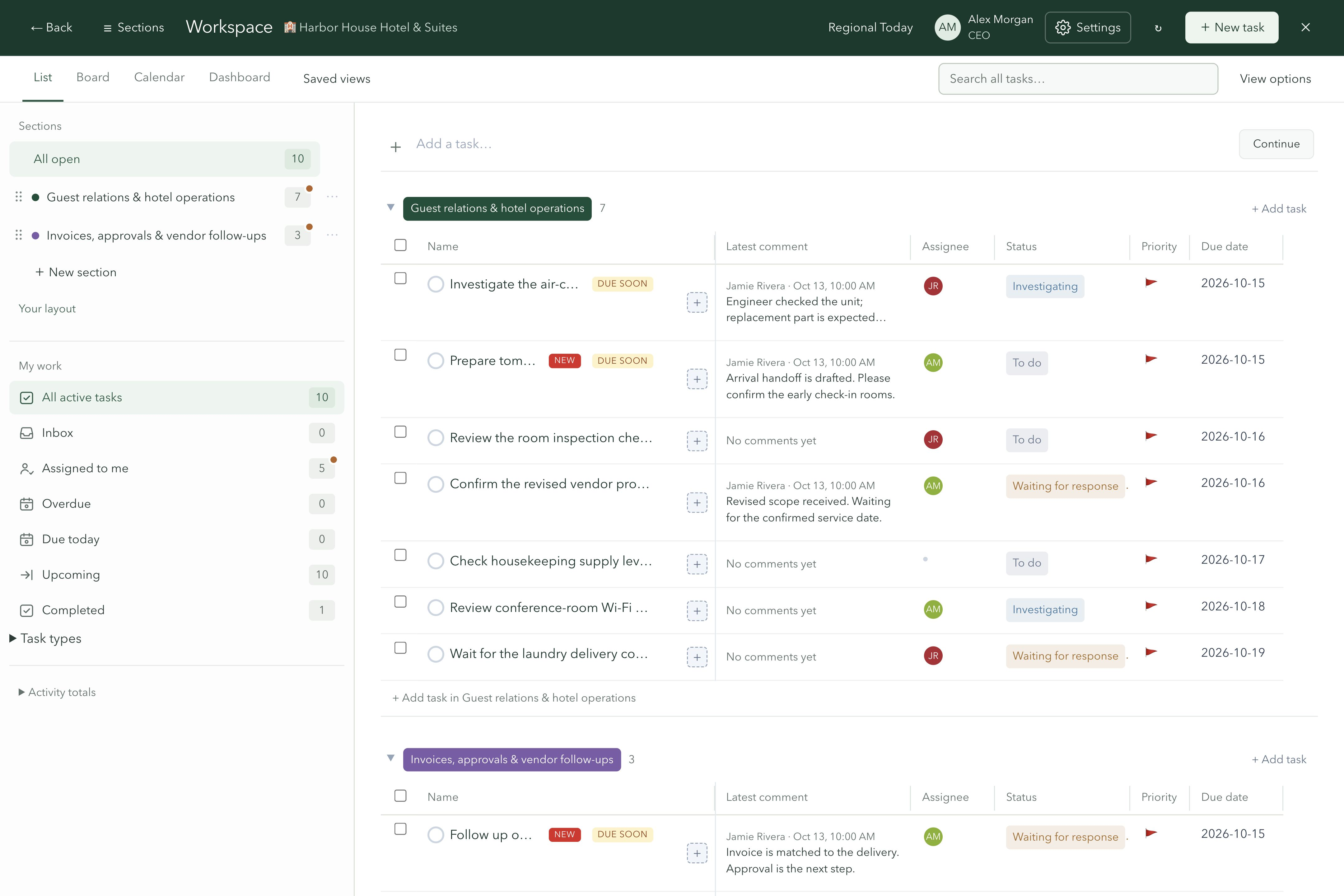
Start with All open tasks, then choose a section to see its pending work. Section totals and new-activity badges make the next item easier to find.
Switch between list, board and calendar views. Configure stages for each section, assign owners and due dates, and keep subtasks, files and comments with the work.
- Pending section counts
- Configurable workflow stages
- Owners, files & comments
See Workspace ↗
FRONT DESK OPERATIONS
Make every handoff count.
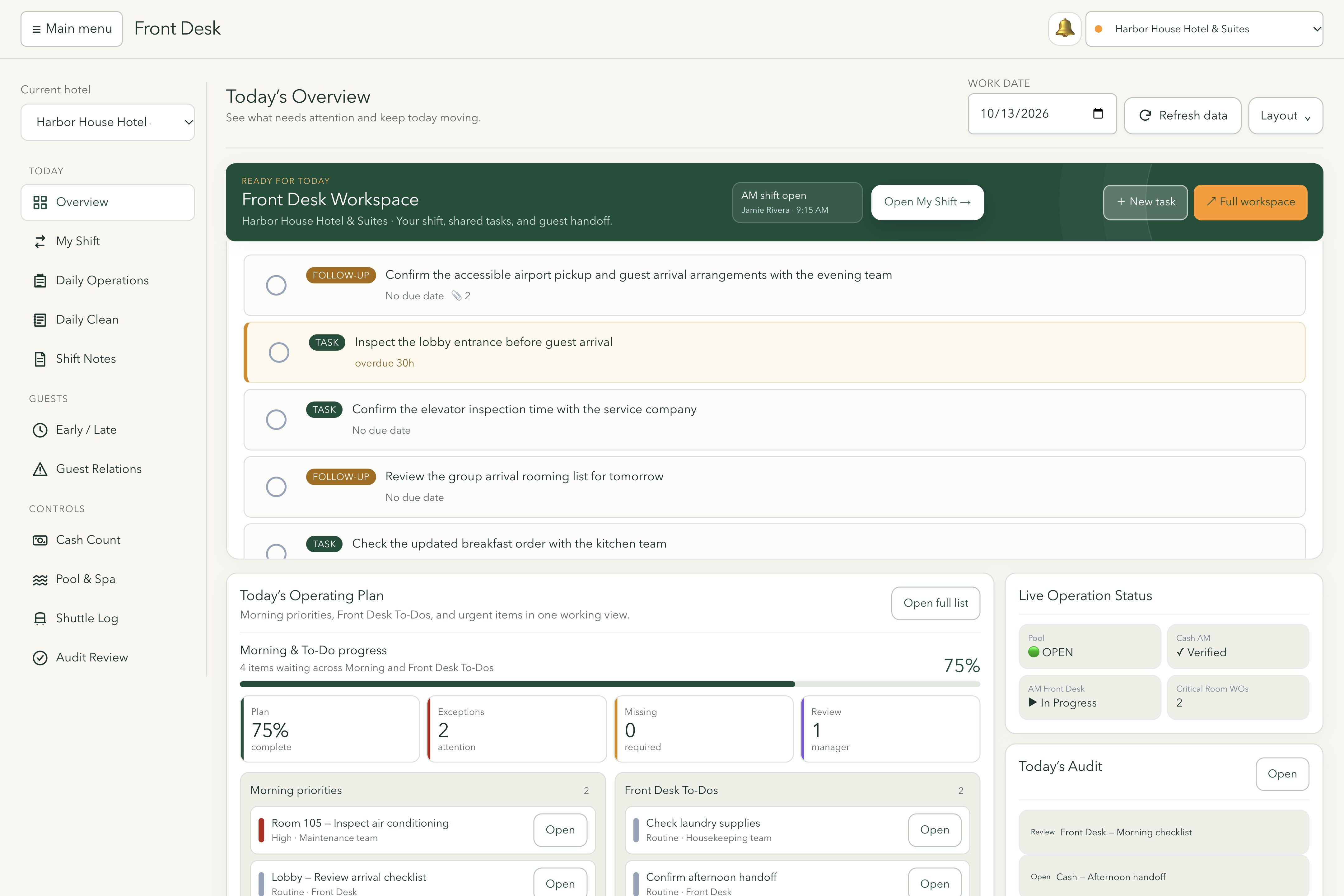
Move between My Shift, Daily Operations, Daily Clean, Shift Notes, Guest Relations, Cash Count and Audit Review in one Front Desk workspace.
Record shift notes and handoffs, work through today’s checklists and follow up on open items. The main menu can hide automatically to give the front desk more room.
- Daily checklists
- Shift handoffs
- Cash counts & audits
See Front Desk ↗
MAINTENANCE & INSPECTIONS
Take an issue through to completion.
Submit mobile work orders with photos, plan preventive maintenance and connect inspection findings to repair work. Keep progress visible from report to resolution.
Use photos to explain an issue, follow repair progress and plan recurring upkeep alongside the requests arriving each day.
- Mobile work orders
- Preventive maintenance
- Inspections & repairs
See room operations ↗
PROPERTY OVERSIGHT
See the work across your hotels.
Business at a glance brings yesterday’s rooms sold and revenue, selected-month performance and year-to-date totals into the dashboard, with report coverage visible.
Switch between the hotels you can access, compare available dashboard figures side by side, or open Regional Today for a shared list of open, overdue and unassigned work.
- Business at a glance
- Compare hotels
- Regional Today
See the dashboard ↗
HOTEL ACCOUNTING SOFTWARE
Our own accounting software.
Built around your hotel.
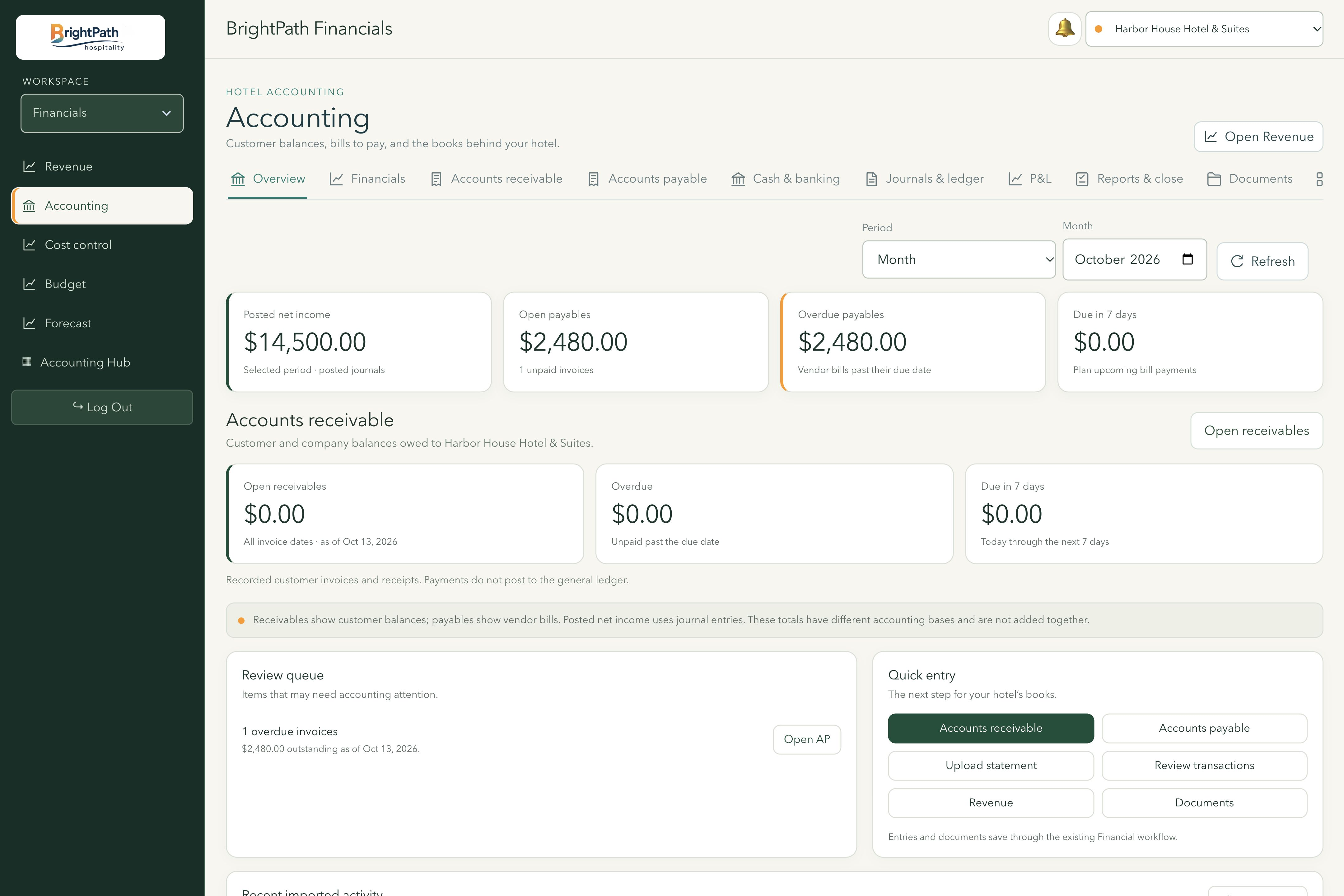
Innwaya includes our own hotel accounting software inside the Brightpath portal. Bring revenue records, customer balances, supplier invoices, journals and financial reporting into the same environment as your hotel operations.
Give your finance team a clear path from the source document to review, posting and reporting, with hotel-specific records and access.
See the accounting workspace ↗
Explore accounting for your hotel ↗
01Revenue & occupancy
Review daily revenue, occupied rooms, taxes and charges by hotel and business date. Monthly summaries show the days included, keeping recorded activity in context.
02Payables & receivables
Organize supplier invoices and due dates, track customer balances and record payments already received. Where supported nightly reports include Direct Bill Aging, review what each company owes in the hotel’s own aging buckets.
03General ledger & period controls
Manage chart accounts and balanced journal drafts, then review and post entries. Reversals and accounting-period controls support an orderly review of the books.
04Financial reports & planning
Produce trial balances, income statements and balance sheets from posted journal entries. Compare budgets and forecasts with recorded results and export reports to Excel.
05Statements & source documents
Upload supported bank and card statements, review extracted transactions and assign categories. Open Cost control to review costs per occupied room and drill into the figures and source detail behind each line.
06PMS reports & nightly intake
Import supported PMS report files and configure hotel-specific report inbox templates. Review extracted figures against the originals before creating journal drafts and posting entries.
09INVENTORY & SAFETY
Stay on top of recurring checks.
Track inventory, daily and recurring inspections, pool and spa readings, and report history. Keep the records teams need close to their daily work.
Bring routine counts and checks into a repeatable process, with past readings and inspection records available for follow-up.
- Inventory counts
- Safety inspections
- Pool & spa logs
See inventory ↗
DOCUMENTS & VENDORS
Put useful information within reach.
Keep operational documents in Document Center and financial source files in Documents, alongside vendor details, contacts and contract reminders.
Vault brings shared accounts and personal notes into the portal, with access based on the account’s clearance and hotel permissions. Password reveals are recorded.
- Document Center
- Vendors & contracts
- Vault
See the accounting workspace ↗
AI ASSISTANCE
Get help with the work in context.
Use the portal’s AI assistant for supported operational, workforce and accounting questions and actions, within the access available to your role.
Ask for help understanding information or carrying out supported actions. The assistant works within the tools and permissions available in your workspace.
- Operational questions
- Supported task actions
- Role-based access
CONNECTED CAPTURE
Turn incoming information into action.
The Innwaya browser extension brings selected emails, attachments, screenshots and webpage content into tasks, with optional dated calendar entries.
Capture the relevant part of an email or webpage with its supporting material, then give it a place in your team’s work instead of leaving it in a separate inbox.
- Email-to-task capture
- Files & screenshots
- Calendar entries
See Workspace ↗
DAILY FLASH & REPORTING
The right update, ready for the day.
Owners can choose who receives the daily flash, which hotels each person sees, when it goes out and what it includes. Revenue, occupancy, ADR and RevPAR can sit alongside open work orders, unpaid bills and guest complaints.
Include shift notes, upcoming life safety inspections, no-shows and rooms out of order when those records are available. Send a past date again, share hotel-specific reports by email or download formatted Excel workbooks.
- Per-recipient hotel selection
- Optional report sections
- Email & Excel
See the daily picture ↗
GUEST RELATIONS
Keep the guest’s next step visible.
Record guest requests, complaints and compensation requests, with the room, context and follow-up action together. Track open cases through to resolution.
Keep early check-in and late check-out requests with their requested date and time, so front desk teams can review the request and continue the conversation.
- Requests & complaints
- Follow-up dates
- Early / late requests
See Front Desk ↗
CALENDAR & MEETINGS
Bring the date and the work together.
Use Workspace Calendar to see dated tasks and captured meetings with the work they relate to. Open the item for its notes, files and meeting details.
The browser extension can capture a meeting invitation or add a dated email to the calendar. Review the details before saving, then use the saved meeting link to join when one is provided.
- Workspace Calendar
- Invitation capture
- Meeting links
See Workspace ↗
ACCESS & PREFERENCES
A workspace that fits each role.
Hotel and role permissions determine which records and tools each person can open. Employees, managers and owners can work in the same portal with access appropriate to their responsibilities.
Accounts can enable emailed two-step sign-in codes and use an emailed password-reset link. Front Desk also offers a saved preference to hide the main menu automatically on larger screens.
- Hotel & role access
- Two-step sign-in
- Front Desk menu preference
See the Front Desk layout ↗
Available tools and connected services depend on your organization’s setup and your role.